Conversation Analysis
Open in CMSConversation Analysis lets you run AI-powered batch analysis across your agent's conversation history. Instead of reviewing threads one by one, you define what to measure — complaint rates, resolution quality, sentiment, trending topics, risk signals — point it at a date range, and get aggregated patterns with AI-generated insights.
Unavailable while Privacy Mode is on. Creating a new run is refused outright for the organization, not just hidden or degraded — conversation content isn't retained long enough to analyze.
How It Works
- Define what to measure — Create or choose analysis types that specify what to evaluate and in what format (yes/no, a score, categories, or a list of extracted items).
- Set up a run — Select one or more analysis types, set a date range, choose how many conversations to sample, and pick an AI model to perform the analysis.
- The engine processes each conversation — Every thread in scope is analyzed against every selected analysis type. Results are cached, so reruns only reprocess failed or changed threads.
- Review aggregated results — Charts and statistics summarize findings across all conversations. AI-generated insights highlight patterns, problems, and recommendations grounded in the data. This lives on the Overview tab of the run's own detail page — a different tab pair from the Runs/Manage Types tabs above, one level down, on one specific run. Its sibling, the Participants tab, turns the same run around to show who was behind the conversations instead of how many landed in each bucket; see Run Results: Participants Tab.
- Drill into individual threads — Click any chart segment to explore the conversations behind the numbers, then open a thread to see per-message breakdowns and evidence citations.
Key Concepts
| Concept | Description |
|---|---|
| Analysis Type | A named definition of what to measure and how to express the result. One type = one dimension of analysis (e.g., "Complaint Detection", "Resolution Score"). |
| Output Type | The format of a result: Binary (yes/no), Score (number), Classification (one or more categories), or List (extracted items). |
| Run | An execution that applies selected analysis types to a batch of conversation threads within a date range. |
| Thread Result | The AI's evaluation of a single conversation for one analysis type — includes the output value, confidence, supporting evidence, and per-message breakdown. |
| Aggregate Result | Run-level statistics computed from all thread results for a type: distribution, mean score, category percentages, item frequency map, etc. |
| Flagged Threads | Conversations the AI marked as warranting attention based on the analysis criteria. |
| Insights | AI-generated conclusions, problems, and recommendations derived from the aggregate data. |
| Participant | A person or entity behind one or more of a run's conversations, with each analysis type's result combined into a single value for them — shown on the run detail page's Participants tab. |
The Two Main Areas
Navigate to Analytics → Analysis in the sidebar to access both areas:
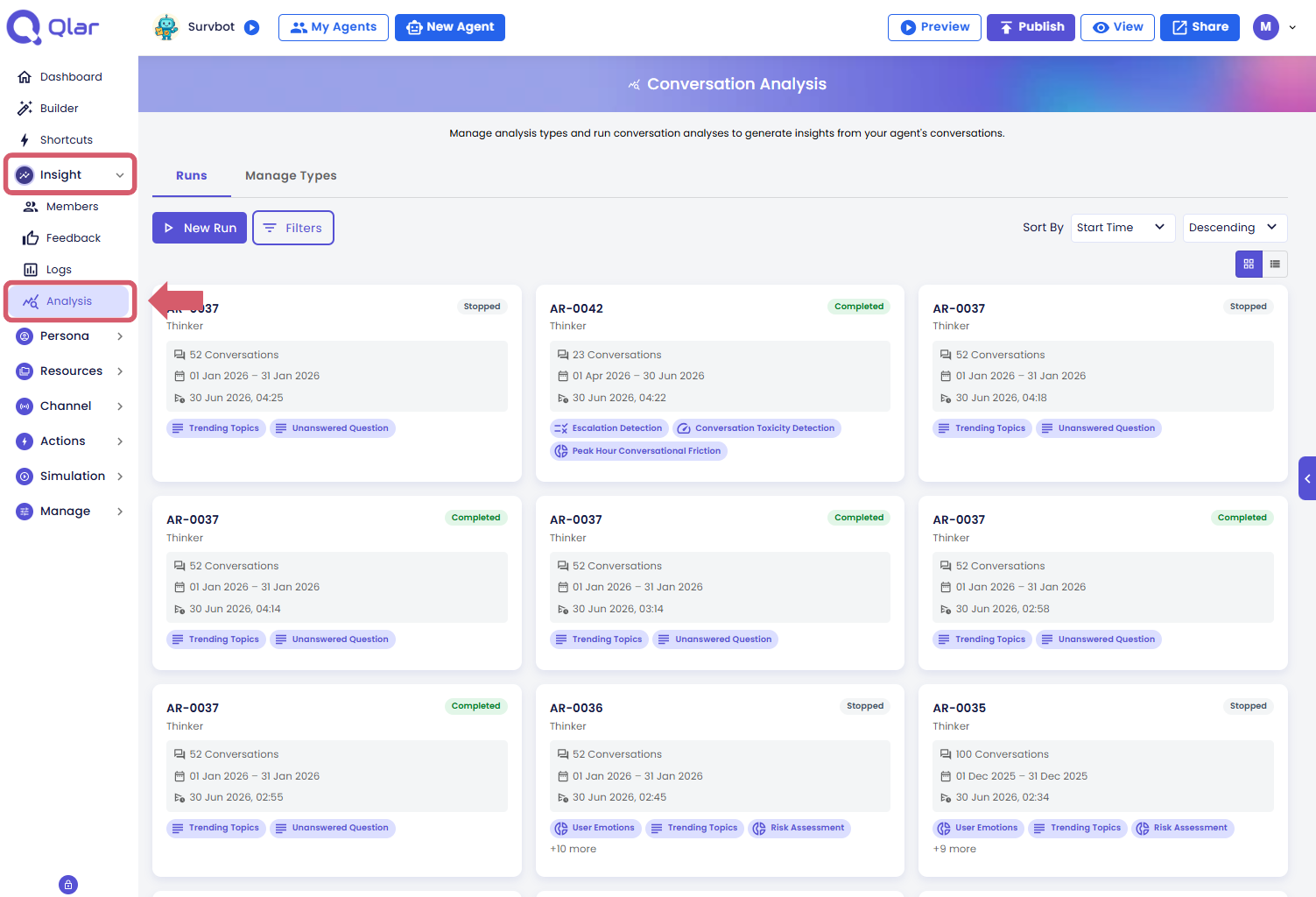
| Tab | Purpose |
|---|---|
| Runs | Create and monitor analysis runs. View results, aggregate charts, trends, and insights. |
| Manage Types | Define and configure analysis types — the measurement templates that runs use. |
Setup Flow
- Review available types — browse predefined types or create your own to define what to measure
- Create a run — select types, date range, and sampling strategy
- Review the Overview — explore aggregate charts and AI-generated insights, then check the Participants tab to see who was behind them
- Explore individual threads — drill into per-message analysis and evidence
Prerequisites
- At least one agent with conversation history in the target date range
- Access role: Owner or Contributor