Knowledge Search on Your Own Model
Open in CMSWhen an agent searches its knowledge base, every document passage and every question is first turned into numbers by an embedding model. By default that is Qlar's embedding model. Choose an embedding model of your own instead, and your knowledge and your end users' questions go only to your own provider account.
Who can do this? Owners and Admins of the organization. The choice applies to every agent in the organization.
Before you start
- An API key for OpenAI, Azure OpenAI, or an OpenAI-compatible server that offers embeddings. See Bring Your Own Key.
- Subscriptions can't be used for knowledge search.
- Changing the model rebuilds every agent's knowledge index, with one call to your model per knowledge chunk on your account. The Tasks tab shows about how many chunks that is before you choose.
1. Add an embedding model
Open the Organizations page → select your organization → Manage organization → AI Models tile → Sources tab → Add API key (or Add models on an existing key).
- From Qlar's list: for OpenAI and Azure OpenAI, tick text-embedding-3-small (1536 dimensions) or text-embedding-3-large (3072 dimensions). Embedding models show "Embeddings · n dimensions" instead of capability chips.
- A model that isn't listed (any provider above, including an OpenAI-compatible server): Add a model that isn't listed, type its Model name, switch on Embedding model (for knowledge search), and fill in Dimensions, the length of its vectors. Not sure? Click Detect: it embeds one short text with the model to read its vector size.
- Azure OpenAI: set the Deployment name when your deployment isn't named after the model.
Click Add key (or Add models). Embedding models are offered only for Knowledge search, never as a chat model.
Which one? In our tests, text-embedding-3-large found the right passage more often than Qlar's index; text-embedding-3-small costs less and did about as well as Qlar's.
2. Choose it for Knowledge search
Tasks tab → Other services → Knowledge search → Embedding model. Leave it on Qlar embeddings (OpenAI) to keep Qlar's.
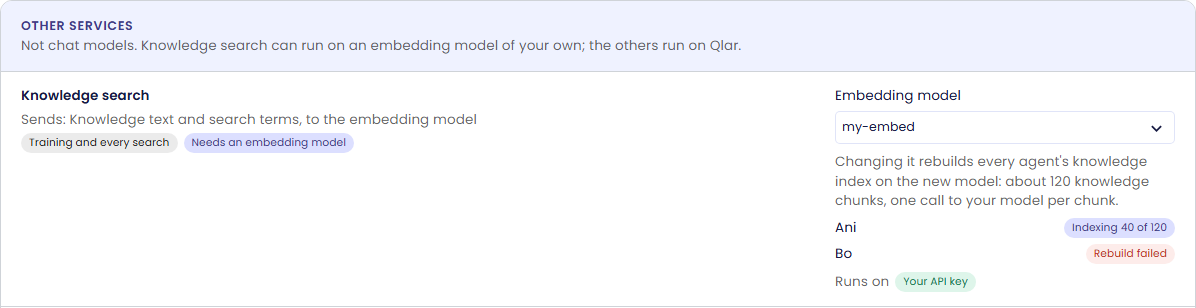
As soon as you choose, every agent's knowledge index is rebuilt on the new model. Under the picker, each agent shows where its rebuild is; the list refreshes on its own while a rebuild runs:
| Status | Meaning |
|---|---|
| Indexing x of y | The rebuild is running. |
| Ready · model | The agent searches its knowledge on your model. |
| Rebuild failed | The rebuild stopped; hover for the reason (for example a wrong or revoked key). Fix the cause, then click Retry next to the status. An agent that has shown Indexing without progress for half an hour gets Retry too. |
| Not indexed yet | Nothing can be searched: your organization only uses its own models and has no Knowledge search model. |
Rebuild all, under the list, rebuilds every agent's index again. It asks first and says about how many knowledge chunks it embeds again on your model.
While an agent's rebuild runs, it keeps searching the index it already has:
- Switching from one model of your own to another: the agent searches its current index with the previous model until the new index is ready, as long as the previous model is still in your organization (not deleted or switched off).
- Moving from Qlar's embeddings the first time: the agent searches Qlar's index, if your organization allows Qlar's models.
Otherwise, for example when you delete the previous model at the same time, the agent can't search its knowledge until its rebuild is ready. The agent's Documents page shows the same status above the list.

Good to know
- Once a rebuild is ready, the old index is deleted, including Qlar's. Going back means another rebuild.
- New documents are indexed on your model as they are trained. Very long passages are shortened to fit the model's input limit.
- Billing: embedding calls on your model cost no Qlar credits; your provider bills you.
- Rotating the key of the embedding model doesn't rebuild anything.
Change or remove
| Task | What happens |
|---|---|
| Choose another embedding model | Every agent's index is rebuilt on the new model; the old index keeps answering until then (while the old model exists) and is deleted when the new one is ready. |
| Clear the picker (back to Qlar) | Every agent's index is rebuilt on Qlar's embeddings, unless your organization only uses its own models: then knowledge search turns off and documents show Not indexed yet. |
| Delete or switch off the model | Same as clearing the picker. |