Only Use Your Own Models
Open in CMSOnly use our own models makes sure your organization's data goes only to AI models you control: models on your own API keys or your own subscription. With it on, every AI job must run on a model of your own. A job without one stops instead of quietly falling back to a Qlar model.
Who can do this? Only the organization's Owner can turn it on or off. Admins see the switch read-only, with "Only the owner can change this."
Before you start
- At least one model of your own: an API key or a subscription, added on the Sources tab.
- On the Tasks tab, a model of your own for every job you want to keep: the agent features (at least Conversation), the Chat helpers and Builder assistants (one model per group is enough, with Use for every task in this group), and, if your agents use a knowledge base, an embedding model for Knowledge search (see Knowledge Search on Your Own Model).
- File check checks every file end users upload: choose a model of your own for it (or for Chat helpers), one that accepts images if end users upload images. Without one, uploads are refused.
Turn it on
Open the Organizations page → select your organization → Manage organization → AI Models tile → Tasks tab. The switch is at the bottom of Where your data goes.

-
Turn on Only use our own models.
-
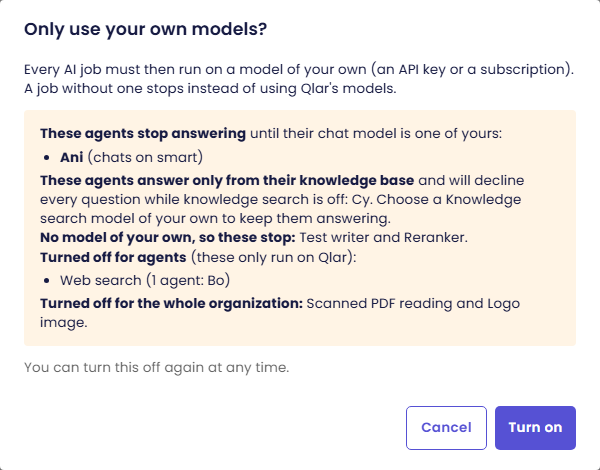
The Only use your own models? dialog checks what this would stop, from your current setup:
- These agents stop answering until their chat model is one of yours, with the model each one chats on.
- These agents answer only from their knowledge base and will decline every question while knowledge search is off.
- No model of your own, so these stop: the tasks still on a Qlar model.
- Turned off for agents (these only run on Qlar): for example Web search, with the agents that use it.
- Turned off for the whole organization: for example Scanned PDF reading and Logo image.
When everything already runs on your own models, it says so.
-
Fix what you want to keep first (Cancel, choose models on the Tasks tab), or click Turn on.
The switch then reads "On: every AI job runs on a model of your own", with who turned it on and when.
What changes
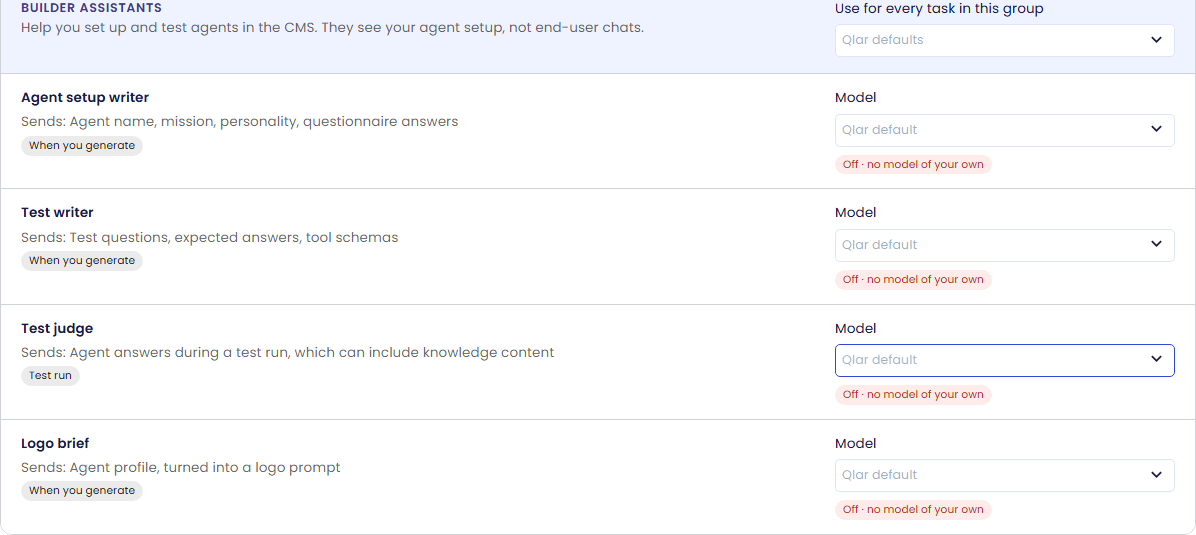
On the Tasks tab, a task without a model of your own reads Off · no model of your own, and the services that only run on Qlar read Off · runs only on Qlar. In model lists across the CMS, Qlar models are shown greyed out with the reason.
| What | With the rule on |
|---|---|
| Agents whose chat model is a Qlar model | Stop answering. Choose a model of your own for Conversation, or on the agent itself. |
| Chat helpers and Builder assistants without a model of your own | Don't run. For example, an escalated chat gets no AI-written summary, and Test judge refuses to run. In the CMS the message names the task and links to AI Models › Tasks. |
| File check | Uploads are refused while it has no model of your own; images are refused while that model can't read images. |
| Knowledge search | Works only with an embedding model of your own; otherwise it is off and documents show Not indexed yet. Agents set to answer only from their knowledge base then decline every question. |
| Web search, Plugins | Off for every agent: they only run on Qlar. |
| Voice calls on Qlar's voice, Speech to text, Text to speech | Off. A Personal agent whose voice runs on your subscription keeps taking calls; other calls end. On WhatsApp, voice notes aren't transcribed and replies go out as text. |
| Scanned PDF reading | Off: PDFs without selectable text (scans) are refused. PDFs with text still work. |
| Logo image (agent setup) | Skipped: upload a logo yourself. |
| Video transcription (knowledge videos) | Videos are refused. |
What end users see. When an agent can't answer, chat shows "This agent can't answer right now. Please contact the agent owner." as an error, not as the agent's reply, and the same text goes back on WhatsApp. A voice call that can't start ends with "This agent can't take voice calls right now. Please type your message instead." End users are never told about your organization's settings; the details are shown only to you in the CMS.
Billing. Models of your own cost no Qlar credits for their tokens. Qlar still charges its per-message platform fee; that fee isn't an AI model call.
Turn it off
The Owner turns the switch off; there is no dialog. Tasks without a model of your own go back to their Qlar default, and the services above come back. If your organization has no Knowledge search model, every agent's knowledge index is rebuilt on Qlar's embeddings, so documents added while the rule was on become searchable again.
Troubleshooting
| Symptom | Cause | Fix |
|---|---|---|
| The switch is greyed out with "Only the owner can change this." | You're an Admin | Ask the organization's Owner. |
| An agent stopped answering | Its chat model is a Qlar model | On Tasks, choose a model of your own for Conversation, or change the agent's model. |
| "Your organization only allows its own AI models, and Test judge has none." | That task has no model of your own | Click Open AI Models › Tasks and choose one for the task or its group. |
| Uploads are refused | File check has no model of your own, or its model can't read images | Choose one for File check or Chat helpers, one that accepts images. |
| Documents show Not indexed yet | No Knowledge search model | Choose an embedding model. |