Exporting Participants
Open in CMSThe Participants tab's Export button, in the toolbar, opens a dialog for exporting the run's participants to a file — it does not download anything directly. This page documents what the dialog offers, what it still leaves out, and what happens when a run is too large to export.
What Gets Exported
Selecting Export opens a dialog with real choices, rather than producing a fixed file:
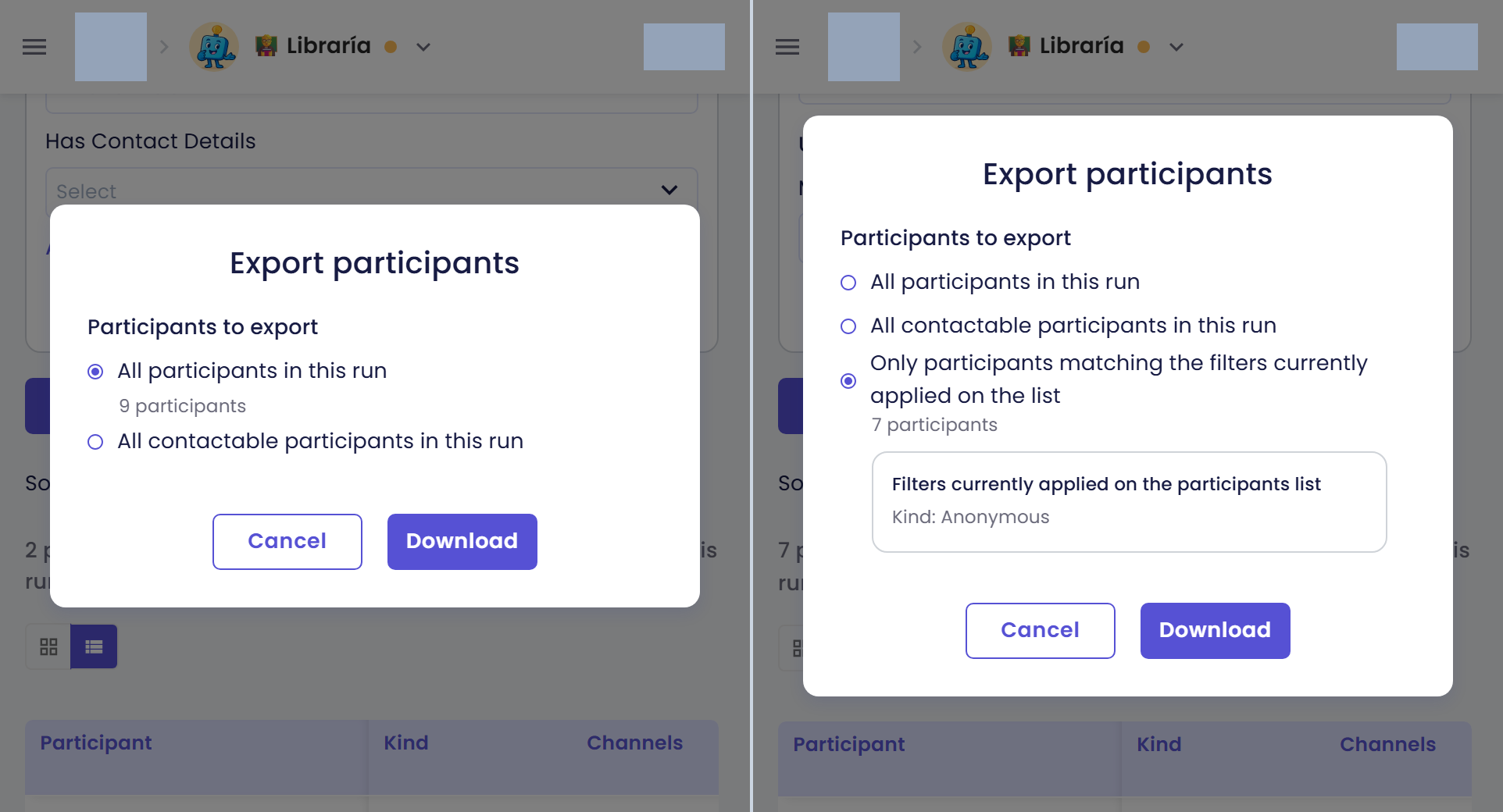
Without any filter applied on the list (left), the dialog only offers All participants in this run and All contactable participants in this run. As soon as a filter is applied on the list (right), a third option appears — Only participants matching the filters currently applied on the list — along with a live row count and a read-only summary of which filters are in effect.
| Property | Behaviour |
|---|---|
| Scope | A choice of three: All participants in this run (the default), All contactable participants in this run (only participants with a captured email or phone — always offered, regardless of any filter set on the list), or Only participants matching the filters currently applied on the list. The Filtered option is only offered when the list actually has an active filter. Choosing a filtered scope genuinely applies whatever filters are currently set on the participant list — the dialog shows a read-only summary of what's about to be exported, plus a live row count for whichever scope is selected |
| Search | Always excluded, regardless of scope — see below |
| File format | Always Xlsx — there is no format choice currently offered |
| Row content | Each participant row mirrors the identity, contact, and per-analysis-type fields shown in the participant list |
There is no "conversations sheet" option today — the export always produces participant rows only, with no per-conversation sheet alongside them.
To run the export:
- Open the Participants tab for the run.
- Select Export in the toolbar to open the export dialog.
- Choose a scope —
All participants in this run,All contactable participants in this run, or (if a filter is active on the list)Only participants matching the filters currently applied on the list. - Select Download to run the export. If the dialog instead shows a size warning and disables Download, narrow your filters or switch scope to bring the row count down, then try again — see below.
Search Is Still Ignored
Whichever scope you choose, your search text is ignored by the export: every participant matching the scope and filter choice above is exported regardless of what's currently typed in the search box. This is the one limitation carried over from the export's earlier behaviour — narrowing by search alone, without also applying the equivalent filters, will not narrow what gets exported.
When the Selection Is Too Large to Export
The dialog previews the row count for your current scope and filter choice before you can even attempt the export. If that count is too large, the export button is disabled outright, with an explanation that the selection is too large for the export sizes currently supported, and that you should narrow the filters or switch scope to bring the row count down.
What to do if you see this:
- Narrow the filters applied to the list, or switch to a narrower scope, to reduce the row count.
- Reopen or re-check the dialog's preview until the row count is back under the limit and the export action is enabled again.
- Run the export as usual — there is nothing to wait for and no notification to watch for; narrowing and retrying is the only path.
How This Differs From the Drill-Down's "Export Participants"
The Overview tab's drill-down drawer has its own, separate export — Export participants, covered in Viewing the Conversations Behind a Chart. The two answer different questions: this export is meant to answer "which participants match the scope and filters I chose" (all participants, or a live filtered subset — search is still excluded either way), while the drill-down's export answers "which participants are behind this exact chart data point." They aren't interchangeable — running one is not a substitute for the other.