Connect to Email
Open in CMSEmail lets people reach your agent the way they already reach your company: they write to a mailbox, and the agent answers in the same thread. For Kirana Group, that means a supplier or site partner can email ask@kirana.example and get an answer from Atlas without logging in to anything. This page explains the two ways to connect a mailbox so you can pick one, then points you to the step-by-step tutorial.
Personal agents too. A personal agent can be connected to a mailbox. Anyone allowed to write to it gets answers given on your behalf.
Before you start
- Your agent answers well in Preview and has been published at least once. See Preview and Publish Changes. The email channel lives on the published copy of your agent, so the Email page shows a warning until you publish.
- You have Owner or Contributor access to the agent in the CMS.
- You have a dedicated mailbox for the agent, for example
ask@kirana.example. The agent answers every human email that arrives in it, so do not connect a mailbox your staff also use for their own mail. - The mailbox can be reached over IMAP (reading) and SMTP (sending). Gmail and Google Workspace are supported with an app password; any other provider works if it offers IMAP and SMTP.
Your connection options
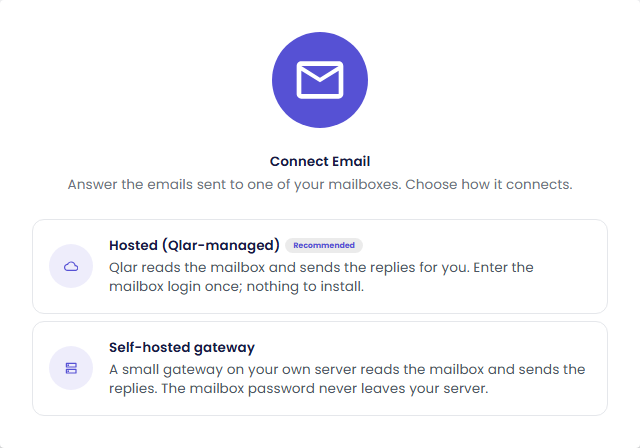
Open Channels → Email in the CMS. If no mailbox is connected yet, the Connect Email page asks how it should connect.
There are two options:
- Hosted (Qlar-managed) is marked Recommended. Qlar reads the mailbox and sends the replies for you. You enter the mailbox login once; nothing to install.
- Self-hosted gateway: a small gateway program runs on your own server, reads the mailbox and sends the replies. The mailbox password never leaves your server.
Compare the options
| Hosted | Self-hosted gateway | |
|---|---|---|
| Effort | Lowest: pick a provider, enter the login, test, connect. | Higher: create a code, run the gateway on a machine, compare a fingerprint, approve. |
| What you need | The mailbox address and an app password. | A machine that stays on and can reach both your mail server and Qlar, with Docker or Python. |
| Who runs the connection | Qlar. | You. |
| Where the mailbox password lives | Stored encrypted by Qlar, used only to read the inbox and send replies. | Only on your server. |
| Choose it when | You want to go live today. | Your policy says mailbox credentials must stay inside your network, or the mail server is not reachable from the internet. |
Start with Hosted unless your security policy rules it out. You can switch later: delete the channel and connect again with the other option.
Choose your tutorial
| Page | Use it when |
|---|---|
| Hosted Mailbox | You want the easiest path. Recommended for your first mailbox. |
| Self-hosted Gateway | The credentials must stay on your own server. |
| Choose Who Gets Answered | After connecting, to decide who the agent may reply to. |
How the agent handles email
- One thread, one conversation. Replies stay in the same email thread, so when the customer writes again the agent remembers what was said.
- One recipient. The agent replies to the person who wrote to the mailbox, never to anyone else named in the email. If someone forwards a message to the mailbox, the answer goes to the person who forwarded it, and the agent reads the forwarded message too. Nobody is put in CC.
- Automatic mail is ignored. Out-of-office replies, newsletters and other automated mail do not get an answer.
- Replies are labelled as automatic replies, so other mail systems do not answer them in a loop.
Understanding Dual Configuration
Unlike WhatsApp and Instagram, the email channel has no separate Draft configuration: it is always attached to the published version of your agent. Publish your changes to make the agent answer with its latest behaviour.
Check the result
- From another address, send an email to the mailbox, for example with the subject
Permit for work above two metresand the questionWho signs the permit for work above two metres? - The reply should arrive in the same thread, with the same kind of answer the agent gives in Preview.
- The conversation appears in your agent's conversation history in the CMS.
Tip: If nothing arrives, open Channels → Email and check that the switch shows Channel on and the status is healthy. The Console lists the last 50 emails in and replies out, so you can see whether the mail was received and why a reply was not sent.
Next steps
- Next in the journey: Manage Who Can Use and Build, to decide who may chat with your agent and who may help configure it.
- Connect other channels: see Connect to WhatsApp, Connect to Instagram or Embed Chat on Your Website.
- Hand difficult conversations to a person: see Hand Off to a Human.
- Every field on the Email page: see Email.