Teach Your Agent Skills
Open in CMSA skill is a written procedure your agent follows for one kind of situation, such as taking a table booking or handling a refund. The agent opens it only when a conversation calls for it, so your everyday instructions stay short and the agent still knows exactly what to do when that situation comes up. This step shows what skills are, when they are worth adding, and how the agent picks one.
Before you start
- Your agent already answers well on its own. See Give Your Agent an Identity and Teach Your Agent.
- You know how to test and publish changes. See Preview and Publish Changes.
- You have Owner or Contributor access to the agent.
Skills, Behavior, Knowledge and tools
Skills sit in their own group in the agent sidebar, between Knowledge and Tools. Each of these answers a different question:
| What it is | When the agent uses it | |
|---|---|---|
| Behavior (Persona) | General instructions: tone, role, rules that apply to every conversation. | On every message. |
| Knowledge | Documents, websites and videos the agent searches for facts. | When it needs a fact to answer. |
| Skills | Step-by-step procedures for specific situations, plus the files they may read. | Only when the conversation matches the skill's Use when line. |
| Tools (API, MCP, plugins, other agents) | Actions the agent can call, such as looking up an order. | When it needs to fetch data or act in another system. |
Put it simply: Knowledge is what the agent knows, Skills is how it goes about a task, and Tools is what it can call. A skill can tell the agent to use a tool or a file at a certain step, but the skill itself is only text.
When to use a skill
Add a skill when:
- A task has steps in a fixed order. For example, a booking needs date, time, number of guests and a name, and the agent must confirm before it finishes.
- The procedure is long, and only some conversations need it. Putting it in Behavior would make every message longer and more expensive. A skill is only loaded when it is needed.
- The procedure relies on reference files. Seating rules, a price list or a reply template can go in an artifact that only this skill may read.
Keep it in Behavior when the rule is short and applies to every conversation (for example "always answer in the language the user writes in"). Put it in Knowledge when it is a fact people ask about, not a procedure.
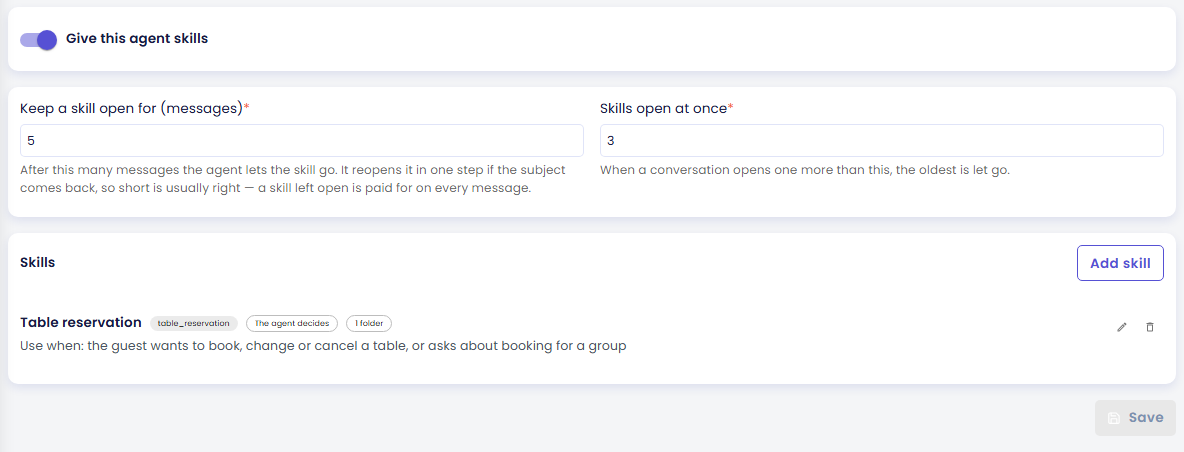
Example: Brew & Chat Cafe's agent, Brew, answers menu and allergen questions all day. Bookings are less frequent but need a careful procedure: check the opening hours, pick a table for the group size, explain the deposit for large groups, and confirm. That procedure becomes a Table reservation skill, and the seating and deposit rules go in a file the skill may read.
How the agent decides to use a skill
- The agent always sees a short list of its skills. For each skill it sees only the Name and the Use when line, never the full instructions. This is why the Use when line must clearly name the situation.
- When a message matches, the agent opens the skill. The full instructions are added to the conversation, and the text in Shown while it opens appears to the person for a moment.
- The skill stays open for a few messages. By default it stays open for 5 messages, and at most 3 skills are open at once. If the subject comes back later, the agent opens the skill again in one step.
- While a skill is open, the agent can read its files. It can read the files in the folders you gave that skill, and only those.
You can change how a skill comes into play with When it applies: The agent decides (the default, described above), When a keyword appears (opens when the person's message contains one of your keywords), or Always in force (always applied, and paid for on every message). See Create a Skill for when to choose each.
A few things to know:
- Skills are off by default. Nothing changes for your agent until you switch on Give this agent skills.
- Each agent can have up to 8 skills by default (your organization's limit can be up to 16). Every skill's Use when line is sent on every message, so keep the list short.
- Skills are not offered when another agent calls yours through Agent-to-Agent.
- Cloning an agent does not copy its skills or artifacts.
The pages in this step
| Page | What you will do |
|---|---|
| Create a Skill | Switch skills on, write a skill with its Use when line and instructions, test it in Preview, and publish it. |
| Give Skills Files (Artifacts) | Make folders of reference files or pictures, upload files, and let a skill read them. |
Where to start: if your procedure needs reference files, create the folder and upload the files first on Give Skills Files (Artifacts), because a skill can only be given folders that already exist. Otherwise, go straight to Create a Skill.
Next steps
- Next in this step: Create a Skill.
- Next in the journey: Talk by Voice, to let people speak with your agent. Skills work on voice calls too.
- Field-by-field reference: Skills and Artifacts.