Voice, Listening and Turn-Taking
Open in CMSOn this page you choose how your assistant sounds and how it listens: its voice, its speaking style, the model that turns speech into text, and (for Turn-by-turn calls) how it decides when the user has finished talking.
All of these settings are on the Agent Voice page (Conversation → Voice in the CMS sidebar) and appear only when Voice conversations is on.
Before you start
- Turn on Voice conversations and choose a conversation style. Several settings here are Turn-by-turn only and are hidden when Natural conversation is selected.
- Optional: write a welcome message, so the voice sample speaks your real greeting.
Voice and listening
The Voice and listening card lets you choose the voice the AI assistant speaks with, how it sounds in conversation, and (Turn-by-turn only) the model used to transcribe what the user says into text.
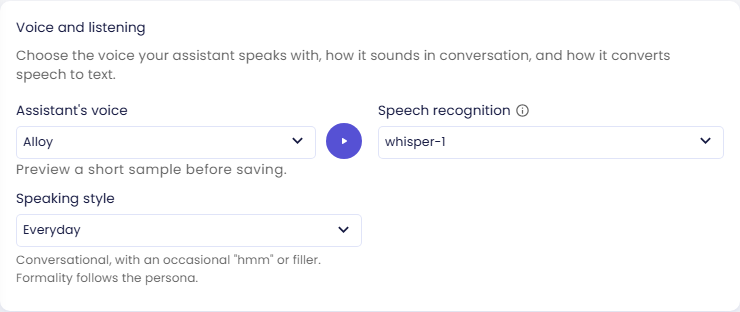
Assistant's voice
Selects the voice used for the assistant's spoken responses. Each conversation style has its own list and keeps its own choice.
Turn-by-turn: alloy, ash, ballad, coral, echo, sage, shimmer, verse, marin (default), cedar.
Click the ▶ button next to the dropdown to hear a sample in the selected voice before saving. The sample speaks your agent's own welcome message, so you hear the voice saying what users will actually be greeted with. If no welcome message has been written yet, a short built-in English sentence is spoken instead.
Natural conversation: 22 voices, default cedar: the ten above, plus twelve with a regional accent:
| Voice | Language | Regional influence | Presentation |
|---|---|---|---|
beacon | English | Filipino | Masculine |
bossa | Portuguese | Brazilian | Feminine |
cinder | English | Southern U.S. | Masculine |
delta | English | Southern U.S. | Feminine |
gleam | English | North American | Feminine |
meridian | English | North American | Masculine |
quartz | English | Australian | Feminine |
ripple | English | Australian | Masculine |
stone | English | Irish | Masculine |
tempo | Portuguese | Brazilian | Masculine |
vesper | English | British | Masculine |
willow | English | Irish | Feminine |
Regional influence describes the voice's speaking style; listen to a voice in your agent's language (for example with the ▶ sample) before choosing it. A voice that appears in both lists still sounds a little different in Natural conversation. For Natural conversation, the ▶ button plays a fixed sample of the voice rather than your welcome message.
While Natural conversation is selected, the Turn-by-turn list stays on the page as Voice for voice-note replies: the voice used when the assistant answers with a voice note (for example on WhatsApp). Voices offered only in Natural conversation can't be used for voice notes.
Speech recognition
Turn-by-turn only. Hidden when Natural conversation is selected: it has built-in speech recognition, which is not billed separately.
Selects the model used to transcribe the user's spoken input into text. Most teams should keep the recommended default.
| Model | Notes |
|---|---|
gpt-transcribe | Default. Billed per minute of audio rather than per token. |
gpt-4o-mini-transcribe | Faster and cheaper than gpt-4o-transcribe, billed per token. |
gpt-4o-transcribe | High-accuracy transcription, billed per token. |
whisper-1 | Legacy transcription model. Kept for agents already configured with it. |
Speaking style
How the assistant sounds when it talks, in either conversation style:
| Value | Behavior |
|---|---|
| Everyday (default) | Conversational, with an occasional "hmm" or filler. Formality follows the persona. |
| Expressive | Livelier and warmer: reacts to the user and uses fillers more often. |
| Formal | Polite, businesslike spoken answers with no fillers or slang. |
The persona's mission and personality from Behavior also shape how the agent speaks during a call.
Conversation flow
Turn-by-turn only. Smart turn-taking, Stop assistant on interruption, and Sensitivity are hidden when Natural conversation is selected: it has no turn detection to tune — it listens the whole time and decides for itself when to speak and when to yield. Its equivalents are under Natural Conversation Settings.
Also called turn-taking or voice activity detection (VAD), this is what tells the system when the user is speaking and when they've finished, so it knows when it's the AI's turn to respond. Without good turn detection, the assistant may cut users off mid-thought, or respond to background noise and filler sounds like "hmm" as if they were a real turn.
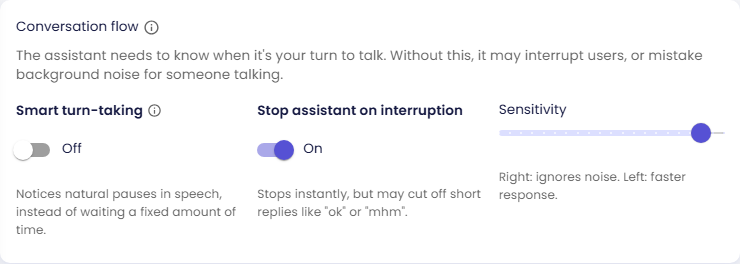
Smart turn-taking
Also known as semantic VAD. Off by default. When enabled, turn detection is model-based rather than purely energy-based — it notices natural pauses in speech instead of waiting a fixed amount of time, which is better at telling real speech apart from filler sounds and background noise.
Stop assistant on interruption
Off by default. When on, the assistant stops speaking the instant the user starts talking — responsive, but it may cut off short replies like "ok" or "mhm". When off, it waits about a second before stopping, so it won't cut off short replies like "ok".
Sensitivity
When Smart turn-taking is on, this is a dropdown controlling how eagerly the model ends the user's turn: low, medium, high, or auto (default). Higher responds faster but may interrupt more.
When Smart turn-taking is off, this is a slider from 0 to 1 setting the energy-based activation threshold. Moving it right ignores more background noise; moving it left responds faster, at the cost of more false interruptions. New agents start at 0.9, which is deliberately hard to talk over: background noise and speaker echo are ignored, and the assistant tends to finish its sentence. If you want an agent that is easy to interrupt, turn on Stop assistant on interruption and move the slider toward 0.5.
Push-to-talk
Turn-by-turn only. Hidden when Natural conversation is selected. A Natural conversation call always listens, so it never shows a hold-to-talk button — even for an agent that had push-to-talk on before switching.
Push-to-talk requires users to hold down a button while they speak: the microphone only streams audio while it's held. This guarantees background noise or other conversations can never be mistaken for a real turn, which is especially useful in noisy environments or when extra privacy is needed.
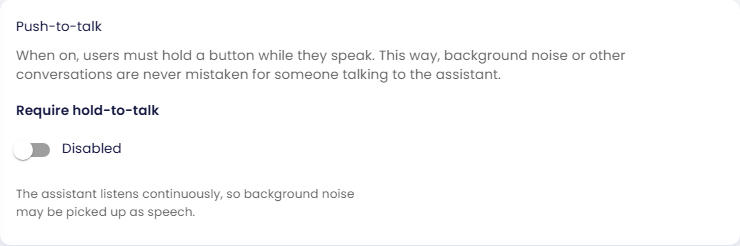
Require hold-to-talk
Off for new agents. When on, a hold-to-talk button is shown in the voice call UI, and users can switch at runtime between it and automatic listening. When off, the call always runs in automatic mode: the assistant listens continuously, so background noise may be picked up as speech.
Start calls in
Only shown when Require hold-to-talk is on. Which mode a voice session opens in:
| Value | Behavior |
|---|---|
| Automatic | The server listens continuously and detects turns using the Conversation flow settings above. |
| Hold-to-talk | The user must hold the talk button to be heard; nothing is streamed otherwise. |
When you turn Require hold-to-talk on, this switches to Hold-to-talk automatically; you can change it back to Automatic before saving. Users can switch anytime during the call.
Check the result
- Click Save.
- Start a voice conversation in the preview (+ menu next to the chat input).
- Listen for the voice and speaking style you chose. For Turn-by-turn, try pausing mid-sentence and talking over the assistant to see whether the turn-taking feels right; adjust Sensitivity or Stop assistant on interruption if it cuts you off or ignores you.
- If you turned on push-to-talk, check that the hold-to-talk button appears and the call opens in the mode you chose.
Next steps
- Voice Screen and On-Screen Content: decide what users see during a call.
- Natural Conversation Settings: if you use Natural conversation.
- Back to Talk by Voice for conversation styles and billing.