Extracted Item Charts (List)
Open in CMSList analysis types extract a set of text items from every conversation — things like mentioned topics, unanswered questions, or named entities. Unlike the other output types, a single conversation can contribute multiple items at once.
Overall Distribution — Item Frequency (Pareto Chart)
A combined bar + cumulative line chart showing the most frequently extracted items:
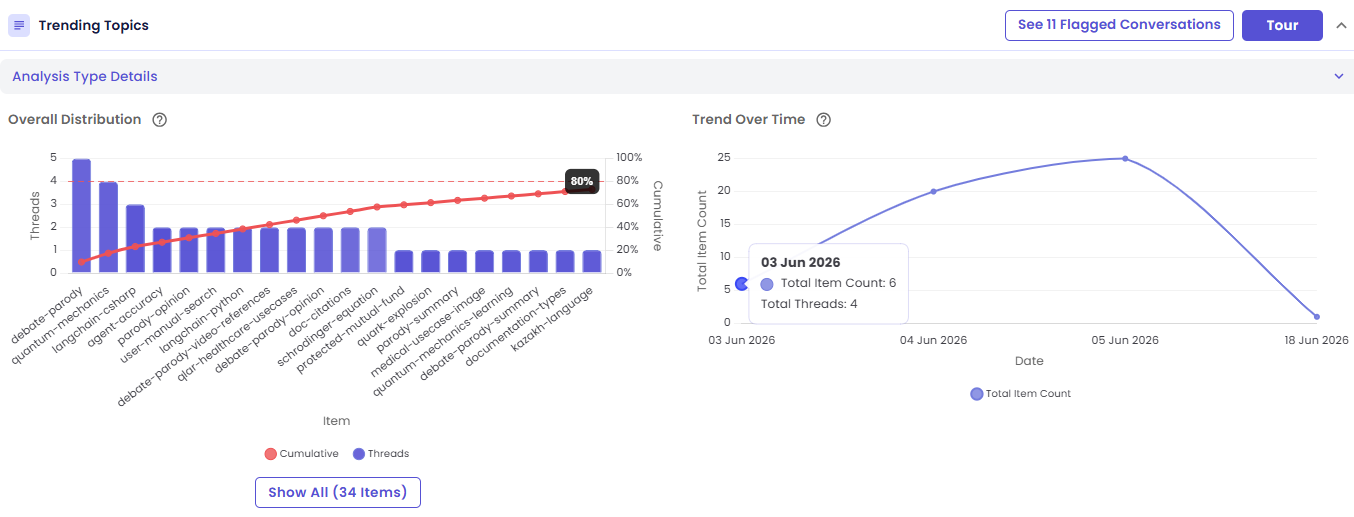
- Bar height = the number of conversations that contained that item (its thread count)
- Bar color intensity = the item's average relevance score — darker bars are more relevant, on an opacity scale from 0.4 to 1.0
- Items are sorted descending by frequency, most common first
- A cumulative percentage line overlays the bars, running left to right
- A red reference line at 80% marks the classic Pareto threshold — items to the left of where the line crosses it account for 80% of the total frequency, i.e. your highest-impact items
- Top 20 items are shown by default; click Show All to expand the full list
Axes: the left Y-axis is thread count, the right Y-axis is cumulative percentage (0–100%), and the X-axis lists item names.
Interactions:
- Hover a bar → see the item name, how many conversations it appeared in, and its average relevance score
- Click a bar → open the drill-down drawer filtered to conversations that contained that item
Trend Over Time — Distinct Items by Day
A line chart showing the total number of distinct items extracted per day.
This is useful for spotting when new topics emerge, or when previously common ones fade out, across the date range — a rising line means new or varied items are showing up; a flattening line means the same items keep repeating.
Interactions:
- Hover a point → see the distinct item count for that day, plus total conversations analyzed that day
- Click a point → open the drill-down drawer for conversations from that date
Next Steps
- Viewing the Conversations Behind a Chart
- Guided Tour & Help — start this card's own Tour for a step-by-step walkthrough