Profile
Buka di CMSHalaman Profile adalah tempat Anda menentukan properti visual dan identitas agent. Pengaturan ini tampil langsung di antarmuka chat dan menentukan bagaimana user mengenali dan mengakses agent Anda.
Dalam tutorial ini Anda mengatur profil Atlas, asisten operasional Kirana Group: nama, link, timezone, logo dan avatar, serta teks kecil di bawah kotak input chat.
Agent kind. Halaman Profile juga menampilkan apakah agent ini personal atau service agent, beserta penjelasan singkat. Owner dan Admin mendapat tautan Change agent kind ke Manage agent › Agent Kind. Lihat Personal Agent vs Service Agent.
Sebelum memulai
- Anda sudah memiliki agent. Jika belum, ikuti Membuat Agent Pertama Anda terlebih dahulu.
- Siapkan gambar logo dan avatar jika Anda ingin mengganti yang default. Untuk Atlas Anda membutuhkan logo lebar untuk mode terang, logo lebar untuk mode gelap, dan avatar persegi.
- Baru di bagian ini? Baca sekilas Pengenalan untuk melihat posisi Profile dalam alur belajar.
Langkah 1: Buka halaman Profile
Di CMS, buka agent Anda lalu pilih Persona → Profile di sidebar kiri. Halaman ini berjudul Agent Profile dan terdiri dari beberapa kartu: field identitas, Agent Logo, Avatar, dan Disclaimer.
Langkah 2: Isi nama, kode, dan timezone
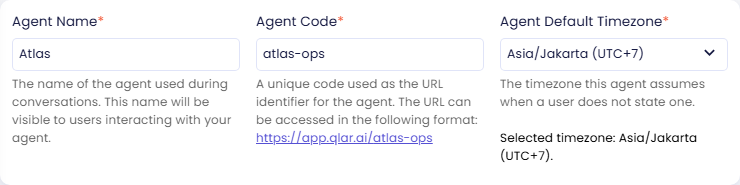
Agent Name, Agent Code, dan Agent Default Timezone berada bersama di kartu pertama. Untuk Atlas, isi:
| Field | Nilai |
|---|---|
| Agent Name | Atlas |
| Agent Code | atlas-ops |
| Agent Default Timezone | Asia/Jakarta (UTC+7) |
Agent Name
Nama yang tampil di header chat dan di seluruh antarmuka user. Pilih nama yang mencerminkan peran agent dan mudah diingat user.
Contoh nilai: Atlas, Nova, Aria, Kira
Agent Code
Pengenal singkat yang aman dipakai di URL dan menjadi bagian dari link publik agent Anda. Teks bantuan di bawah field menampilkan link lengkapnya saat Anda mengetik. Untuk Atlas, link-nya:
https://app.qlar.ai/atlas-ops
Saat Anda membuat agent, CMS memberinya kode acak berisi delapan huruf dan angka, misalnya 892d3483. Anda bisa menggantinya dengan kode yang lebih mudah diingat.
Field ini wajib diisi, dan kodenya harus unik di antara semua agent di platform (bukan hanya di organization Anda). Pengecekan tidak membedakan huruf besar dan kecil, sehingga Atlas-Ops dan atlas-ops dianggap kode yang sama. Jika kode sudah dipakai, penyimpanan gagal dan Anda perlu memilih kode lain. CMS tidak membatasi karakter yang boleh dipakai, tetapi karena kode menjadi bagian dari link, gunakan huruf kecil, angka, dan tanda hubung, dan hindari spasi. Setelah diatur dan dibagikan ke publik, sebaiknya jangan diubah karena link yang sudah ada akan rusak.
Contoh nilai: atlas-ops, hr-assistant, nova-v2, 892d3483
Agent Default Timezone
Zona waktu yang dipakai agent ketika user tidak menyebutkannya. Zona waktu ini menjadi acuan untuk semua penalaran tanggal dan waktu yang dilakukan agent.
Pengaturan ini memengaruhi:
- Pemisahan thread (percakapan dipisah pada tengah malam di zona waktu ini)
- Jawaban atau tindakan terjadwal yang bergantung pada tanggal dan waktu
Kantor dan lokasi proyek Kirana berada di Indonesia, jadi Atlas memakai Asia/Jakarta (UTC+7).
Pilih zona waktu yang mewakili sebagian besar user Anda. User di zona waktu lain tetap bisa berinteraksi seperti biasa. Pengaturan ini hanya memengaruhi cara agent menafsirkan "hari ini" dan batas hari secara internal.
Langkah 3: Unggah logo
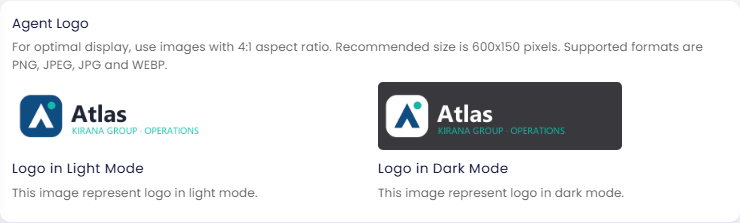
Logo tampil di header chat dan di halaman daftar agent. Unggah versi terpisah untuk mode terang dan mode gelap agar logo selalu terbaca jelas. Klik setiap area gambar di kartu Agent Logo untuk mengunggah file.
| Varian | Penggunaan yang disarankan |
|---|---|
| Logo in Light Mode | Ditampilkan saat antarmuka user dalam mode terang |
| Logo in Dark Mode | Ditampilkan saat antarmuka user dalam mode gelap |
Ketentuan gambar:
- Rasio aspek: 4:1 (format lebar/banner)
- Ukuran yang disarankan: 600 × 150 piksel
- Format: PNG, JPEG, JPG, WEBP
Jika Anda hanya mengunggah satu varian, gambar yang sama dipakai untuk kedua mode. Gunakan versi dengan kontras yang cukup untuk setiap latar belakang.
Untuk Atlas, logo mode terang memakai teks gelap di latar terang, dan logo mode gelap memakai teks putih agar tetap terbaca di header yang gelap.
Langkah 4: Unggah avatar agent
Agent Avatar adalah gambar bulat kecil yang tampil di samping pesan agent dalam percakapan. Hanya ada satu avatar, yaitu untuk agent. Tidak ada field avatar untuk user di sini.
Ketentuan gambar:
- Rasio aspek: 1:1 (persegi)
- Ukuran yang disarankan: 128 × 128 piksel
- Format: PNG, JPEG, JPG, WEBP
Untuk Atlas, unggah ikon Atlas berwarna navy saja, tanpa tulisan. Avatar tampil kecil, jadi ikon sederhana lebih mudah dikenali daripada logo lengkap.
Langkah 5: Tentukan disclaimer dan backlink Qlar
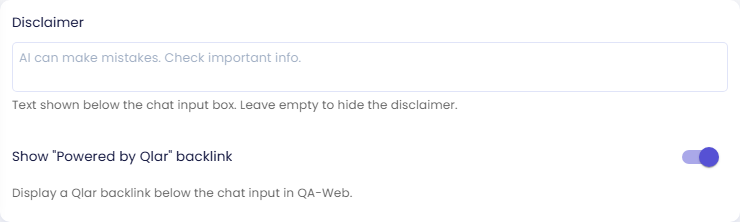
Kartu Disclaimer berisi dua pengaturan yang tampil di bawah kotak input chat di QA-Web.
Disclaimer
Teks singkat yang tampil di bawah kotak input chat, misalnya untuk mengingatkan user tentang keterbatasan AI. Teks bantuannya jelas: Leave empty to hide the disclaimer. Artinya, jika field dikosongkan, disclaimer tidak ditampilkan. Teks abu-abu di dalam field kosong ("AI can make mistakes. Check important info.") hanya placeholder. Jika Anda ingin teks itu tampil, ketikkan ke dalam field.
Untuk Atlas, biarkan field ini kosong. Atlas menyebutkan bagian SOP yang menjadi dasar setiap jawaban, sehingga orang bisa mengecek sumbernya sendiri, dan tampilan chat tetap rapi. Jika agent Anda memberi saran yang perlu dicek ulang, ketikkan pengingat singkat di sini.
Show "Powered by Qlar" backlink
Saat switch ini aktif, QA-Web menampilkan backlink Qlar di bawah kotak input chat. Matikan jika Anda tidak ingin link itu tampil. Untuk Atlas, biarkan aktif.
Langkah 6: Simpan perubahan
- Klik Save di bagian bawah halaman.
- CMS menampilkan pertanyaan Are you sure to save your changes?
- Klik Yes.
Tombol Save nonaktif selama masih ada gambar yang sedang diunggah, jadi tunggu sampai semua unggahan selesai. Perubahan langsung berlaku di panel preview. Agar terlihat oleh user akhir, Anda juga harus melakukan Publish pada agent.
Periksa hasilnya
Setelah Anda menyimpan, panel preview di sisi kanan halaman dimuat ulang dengan perubahan Anda. Pastikan:
- Nama Atlas dan logo Atlas tampil di chat.
- Avatar Atlas yang bulat tampil di samping pesan agent.
- Di bawah kotak input chat tampil Powered by Qlar tanpa disclaimer, karena field Disclaimer kosong. Jika Anda mengetik disclaimer, teks itu juga tampil di sana.
- Agent menjawab pertanyaan tanggal (misalnya, "What day is it today?") sesuai waktu Jakarta.
Preview menjalankan draft Anda. User akhir tetap melihat versi published sampai Anda mengklik Publish. Lihat Preview dan Publish Perubahan.
Langkah berikutnya
- Behavior: tulis mission dan personality yang membentuk setiap jawaban (langkah berikutnya).
- Appearance: sesuaikan warna chat dengan brand Anda.
- About: tambahkan deskripsi publik dan detail kontak.